
Catfood Desktate2.22.0003 - Download
You'll be able to download in few seconds.
Publisher Description
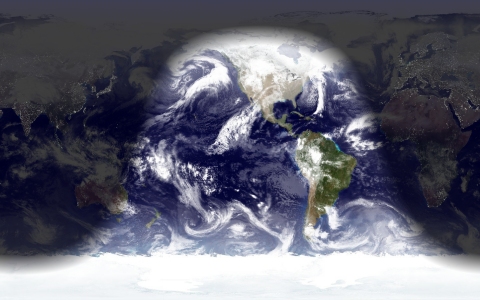
Catfood Desktate is an eye catching earth simulator that combines satellite imagery, near real time cloud data and optional layers including political borders and place names. The continuously updated result can be set as your desktop wallpaper or used as a screensaver. Desktate features include:
The terminator between day and night is continuously calculated; you can see sunrise and sunset around the world and observe the changing seasons throughout the year. Desktate includes several satellite images and you can download more to find the perfect combination. You can also control the transparency of the night image and the duration of sunset/sunrise.
You can choose to rotate the image (so for example local noon or local midnight is always at the center of the screen) or fix the map on one location and watch the terminator progress across your screen during the day.
Optional layers include composite weather satellite cloud images (updated every three hours), Blue Marble 2 monthly imagery (realistic snow and ice cover throughout the year), political borders, time zones and place names. You can create and merge in your own data, or create a custom list of place names.
About Catfood Desktate
This Themes & Wallpaper program is available in English. It was last updated on 29 September, 2026. Catfood Desktate is compatible with the following operating systems: Windows.
The company that develops Catfood Desktate is Catfood Software. The latest version released by its developer is 2.22.0003.
The download we have available for Catfood Desktate has a file size of 9.4 MB. Just click the green Download button above to start the downloading process. The program is listed on our website since 2006-11-04 and was downloaded 0 times. We have already checked if the download link is safe, however for your own protection we recommend that you scan the downloaded software with your antivirus. Your antivirus may detect the Catfood Desktate as malware if the download link is broken.
How to install Catfood Desktate on your Windows device:
- Click on the Download button on our website. This will start the download from the website of the developer.
- Once the Catfood Desktate is downloaded click on it to start the setup process (assuming you are on a desktop computer).
- When the installation is finished you should be able to see and run the program.
Program Details
System requirements
Download information
Pricing
Version History
version 2.22.0003
posted on 2006-11-04
Time Zone Update
Disclaimer
External Download
We do not host Catfood Desktate on our servers. We did not scan it for viruses, adware, spyware or other type of malware. This app is hosted by the software publisher and passed their terms and conditions to be listed there. We recommend caution when installing it.
The external download link for Catfood Desktate is provided to you by apps112.com without any warranties, representations or guarantees of any kind, so access it at your own risk.
If you have questions regarding this particular app contact the publisher directly. For questions about the functionalities of apps112.com contact us.
